Monday, 17 August 2015

SP2013 plan for upgrading the Distributed cache - with screenshots

Open SharePoint Management Shell - RUNAS Administrator

Get into the cache:

Use-CacheCluster

Check the cache cluster status:

Get-CacheHost

Verify current version is CU1: 1.0.4639.0


(Get-ItemProperty "C:\Program Files\AppFabric 1.1 for Windows Server\PowershellModules\DistributedCacheConfiguration\Microsoft.ApplicationServer.Caching.Configuration.dll" -Name VersionInfo).VersionInfo.ProductVersion


 Stop the Cache on the server:

Stop-SPDistributedCacheServiceInstance -Graceful

Check the cache cluster status:

Get-CacheHost

Check Output shows the current server is DOWN:


Run the .exe from: C:\APPFabricCU5


Modify the DistributedCacheService.exe.config file in C:\Program Files\AppFabric 1.1 for Windows Server - copy the file first


Then add the line:


Restart the cache on the server:

$instance = Get-SPServiceInstance | ? {$_.TypeName -eq "Distributed Cache" -and $_.Server.Name -eq $env:computername}
$instance.Provision()

Check the cluster with Get-CacheHost:


If it comes up as status UNKNOWN: Just wait a bit and then try Get-CacheHost again


Verify version is now: 1.0.4655.0

(Get-ItemProperty "C:\Program Files\AppFabric 1.1 for Windows Server\PowershellModules\DistributedCacheConfiguration\Microsoft.ApplicationServer.Caching.Configuration.dll" -Name VersionInfo).VersionInfo.ProductVersion


WAIT 5 mins before doing next server

PLAN


This is the plan I used to upgrade the Distributed cache on a Production farm with 4 Web Front Ends.

Step
Server
Action
1
SP01
Open SharePoint Management Shell - RUNAS Administrator
2
SP01
Get into the cache:
3
SP01
Check the cache cluster status:
4
SP01
Verify current version is CU1: 1.0.4639.0
5
SP01
Stop the Cache on the server:
6
SP01
Check the cache cluster status:
7
SP01
Run the .exe from: C:\APPFabricCU5
8
SP01
Modify the DistributedCacheService.exe.config file in C:\Program Files\AppFabric 1.1 for Windows Server - copy the file first
9
SP01
Restart the cache on the server:
10
SP01
Check the cache cluster status:
11
SP01
Verify version is now: 1.0.4655.0
12
SP01
WAIT 5 mins before doing next server
13
SP02
Open SharePoint Management Shell - RUNAS Administrator
14
SP02
Get into the cache:
15
SP02
Check the cache cluster status:
16
SP02
Verify current version is CU1: 1.0.4639.0
17
SP02
Stop the Cache on the server:
18
SP02
Check the cache cluster status:
19
SP02
Run the .exe from: C:\APPFabricCU5
20
SP02
Modify the DistributedCacheService.exe.config file in C:\Program Files\AppFabric 1.1 for Windows Server - copy the file first
21
SP02
Restart the cache on the server:
22
SP02
Check the cache cluster status:
23
SP02
Verify version is now: 1.0.4655.0
24
SP02
WAIT 5 mins before doing next server
25
SP03
Open SharePoint Management Shell - RUNAS Administrator
26
SP03
Get into the cache:
27
SP03
Check the cache cluster status:
28
SP03
Verify current version is CU1: 1.0.4639.0
29
SP03
Stop the Cache on the server:
30
SP03
Check the cache cluster status:
31
SP03
Run the .exe from: C:\APPFabricCU5
32
SP03
Modify the DistributedCacheService.exe.config file in C:\Program Files\AppFabric 1.1 for Windows Server - copy the file first
33
SP03
Restart the cache on the server:
34
SP03
Check the cache cluster status:
35
SP03
Verify version is now: 1.0.4655.0
36
SP03
WAIT 5 mins before doing next server
37
SP04
Open SharePoint Management Shell - RUNAS Administrator
38
SP04
Get into the cache:
39
SP04
Check the cache cluster status:
40
SP04
Verify current version is CU1: 1.0.4639.0
41
SP04
Stop the Cache on the server:
42
SP04
Check the cache cluster status:
43
SP04
Run the .exe from: C:\APPFabricCU5
44
SP04
Modify the DistributedCacheService.exe.config file in C:\Program Files\AppFabric 1.1 for Windows Server - copy the file first
45
SP04
Restart the cache on the server:
46
SP04
Check the cache cluster status:
47
SP04
Verify version is now: 1.0.4655.0
48
SP04
WAIT 5 mins before doing next server


Wednesday, 12 August 2015

SharePoint service transition: Criteria workflow for acceptance of Production farm to Live

Below is a real-world list of steps that can be used to track SharePoint acceptance to Live service:

Criteria
Output
High Level Design (HDD) authorised 
HLD Document
Low Level Design (LLD) Authorised 
LLD Document
Service Design Document (SDD) authorised 
SDD Document
Where one exists, has the best practice analysis tools been run against the estate?
Best Practice Report
Application performance for scale: What evidence is there that this architecture will work for the nominated load?
Run a load tester application to model the load. Run sizing tools from the vendor.
As built document.
Run through LLD against currently installed environment to check settings are as they say. Produce compliance / Gaps document.
Has the design been validated that it matches the solution deployed? I.E. the LLD matches the solution & SDD. This is regarded as 'as built' and significantly reduces the risk of the intended design not being implemented correctly
Do this with a different resource than who wrote the LLD to reduce the risk of repeated errors
Can all workload characteristics be measured and planned for?
SCOM monitoring in place
Backup and Recovery Implemented and Tested
Test Plan
Has monitoring been setup & tested as detailed in the LLD, or the monitoring and management plan document
SCOM monitoring in place in prelive and Test plan updated. Testing carried out
Have Topology Diagrams been loaded into the Procedures Database?
Document in Procedures Database
SSL and other certificates documented
SSL and other Cert Information stored
Are support procedures in place? E.g. monitoring, reporting
Monitoring and reporting processes in place
Are disk/storage thresholds set and monitored?
SCOM thresholds in place
Process in place to handle breaches in storage?
Process Database updated with breach process
Are the Server pre-live checks complete and passed?
Pre-live checks are done
Is SCOM clear of alerts for whole estate?
Review Pre-live in SCOM
Has the implementation plan been agreed?
Project Plan updated (use the collateral in the ST folder for OAC/OAM)
Go Live Tasks/Final commissioning
Final Go Live checks completed
Are the Servers set to live in SCOM?
Servers set to live

Monday, 10 August 2015

Group policy settings for SP2013

Recently I had to sort out group policy user rights for SP2013 service accounts - I put together the following table which may be useful to anyone else out there who has to do this:

GPO setting
Service Account
Path
Notes
Act as part of the Operating System
Claims to Windows
\Computer Configuration\Windows Settings\Security Settings\Local Policies\User Rights Assignment

Allow log on locally
Farm
\Computer Configuration\Windows Settings\Security Settings\Local Policies\User Rights Assignment
Also added Administrators
Adjust memory quotas for a process
Setup
\Computer Configuration\Windows Settings\Security Settings\Local Policies\User Rights Assignment


Reporting Services
\Computer Configuration\Windows Settings\Security Settings\Local Policies\User Rights Assignment


Search
\Computer Configuration\Windows Settings\Security Settings\Local Policies\User Rights Assignment


Service Apps
\Computer Configuration\Windows Settings\Security Settings\Local Policies\User Rights Assignment


Web Apps
\Computer Configuration\Windows Settings\Security Settings\Local Policies\User Rights Assignment


Farm
\Computer Configuration\Windows Settings\Security Settings\Local Policies\User Rights Assignment

Impersonate a client after authentication
Claims to Windows
\Computer Configuration\Windows Settings\Security Settings\Local Policies\User Rights Assignment
Also added Administrators and SERVICE

Web Apps
\Computer Configuration\Windows Settings\Security Settings\Local Policies\User Rights Assignment


Farm
\Computer Configuration\Windows Settings\Security Settings\Local Policies\User Rights Assignment


Search
\Computer Configuration\Windows Settings\Security Settings\Local Policies\User Rights Assignment

Logon as a batch job
Workflow
\Computer Configuration\Windows Settings\Security Settings\Local Policies\User Rights Assignment


Farm
\Computer Configuration\Windows Settings\Security Settings\Local Policies\User Rights Assignment


Web Apps
\Computer Configuration\Windows Settings\Security Settings\Local Policies\User Rights Assignment


Service Apps
\Computer Configuration\Windows Settings\Security Settings\Local Policies\User Rights Assignment

Logon as a service
Setup
\Computer Configuration\Windows Settings\Security Settings\Local Policies\User Rights Assignment


Claims to Windows
\Computer Configuration\Windows Settings\Security Settings\Local Policies\User Rights Assignment


Search
\Computer Configuration\Windows Settings\Security Settings\Local Policies\User Rights Assignment


Service Apps
\Computer Configuration\Windows Settings\Security Settings\Local Policies\User Rights Assignment


Workflow
\Computer Configuration\Windows Settings\Security Settings\Local Policies\User Rights Assignment


Farm
\Computer Configuration\Windows Settings\Security Settings\Local Policies\User Rights Assignment


Web Apps
\Computer Configuration\Windows Settings\Security Settings\Local Policies\User Rights Assignment

Replace a process level token
Setup
\Computer Configuration\Windows Settings\Security Settings\Local Policies\User Rights Assignment


Reporting Services
\Computer Configuration\Windows Settings\Security Settings\Local Policies\User Rights Assignment


Search
\Computer Configuration\Windows Settings\Security Settings\Local Policies\User Rights Assignment


Service Apps
\Computer Configuration\Windows Settings\Security Settings\Local Policies\User Rights Assignment


Web Apps
\Computer Configuration\Windows Settings\Security Settings\Local Policies\User Rights Assignment


Farm
\Computer Configuration\Windows Settings\Security Settings\Local Policies\User Rights Assignment

Local Administrators Group
Setup
\Computer Configuration\Windows Settings\Security Settings\Local Policies\User Rights Assignment\Restricted Groups


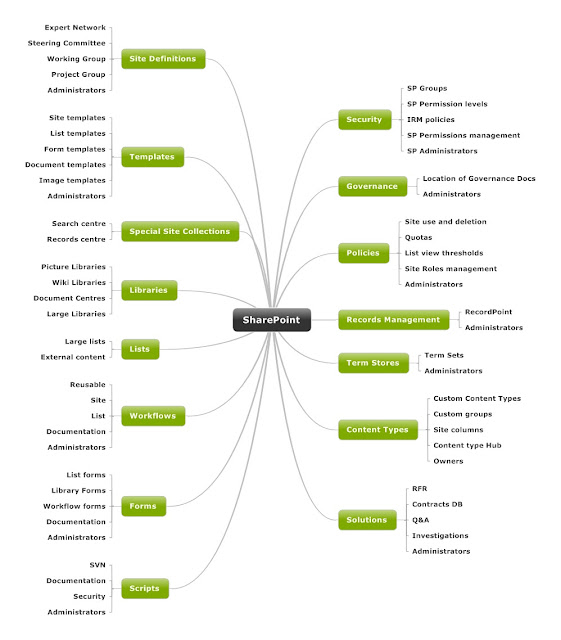
SharePoint Information Architecture Diagram

Here is the template I use for Information Architecture designs. It's built using Mindjet and I flesh the nodes out with the low level d...