Showing posts with label Governance. Show all posts

Saturday, 23 March 2013

Governance - SharePoint service overview


·         The SharePoint ProjectSpace and TeamSpace services are designed for:
o   Sharing of information and documents specific to either teams, Business Units, Divisions or Group-wide (TeamSpace) or project lifecycle information (ProjectSpace)
§  Sites can be restricted to particular users or groups
o   Collaborating on information and documents
o   The types of information that can be stored in either of these services are:
§  Document Libraries
§  Lists
§  Wiki
§  Survey
§  Discussion Board
§  Blogs
§  Meeting Workspace
§  Document Workspace
§  InfoPath Form Libraries

·         The service should not be used for the following:
o   Storing any data that is classified as Highly Confidential
o   Hosting Web Based Content
§  No publishing of HTML or HTM pages or any other 3rd party created web pages.
§  For use on other systems or platforms (i.e. images for Interchange)
o   Hosting Media (i.e. video)
o   Host business critical information or application data
o   Hosting business processes (including control, data management or workflow)
o  End User Computing (EUC) solutions such as use of MS Access, MS Excel etc to download data or query lists etc
o   Creating customised applications
§  Only standard Web Parts are available on these services
§  Host JavaScript or any form of code libraries
§  Customised pages (CSS etc.)
o   Replacement for databases (i.e. large lists >2000)
§  This breaks Microsoft recommendation and are generally considered business applications
o   Deeply nested user and group permissions
o   Access via any development tools (i.e. SharePoint Designer)
o   Large SharePoint Sites should not synchronised offline by individuals

Governing site quota increase requests


Check the following as a standard approach to these requests.

Each request should have the following four checks:

Check
Challenge
Expected Answer
Site Collection Admin
Has the request been completed by one of the Site Collection Administrators?
Yes
Warning Limit
Has the site storage reached the current quota warning limit (NB: All warning limits are 100Mb below the quota limit)?
Yes
Recycle Bin
Does the Site Collection recycle bin contain a large amount of content (i.e. if this was emptied or reviewed would this bring the site back under the current quota warning limit)?
No
Versioning
Does the site have uncontrolled versioning switched on in one or more document libraries or lists (i.e. Is the majority of the storage held in versions of files that are likely to be surplus to requirements)?
No

In addition to the above, check that the Cost Centre Manager approval is attached and the Cost Centre/Project Code is updated.

For all requests I expect to see the answers to the above recorded in the INTERNAL: Notes field as;
Site Collection Admin - Yes
Warning Limit - Yes
Recycle Bin - No
Versioning - No

If any of the items are not answered as expected then the increase should be rejected and the reason why noted in the notes field.

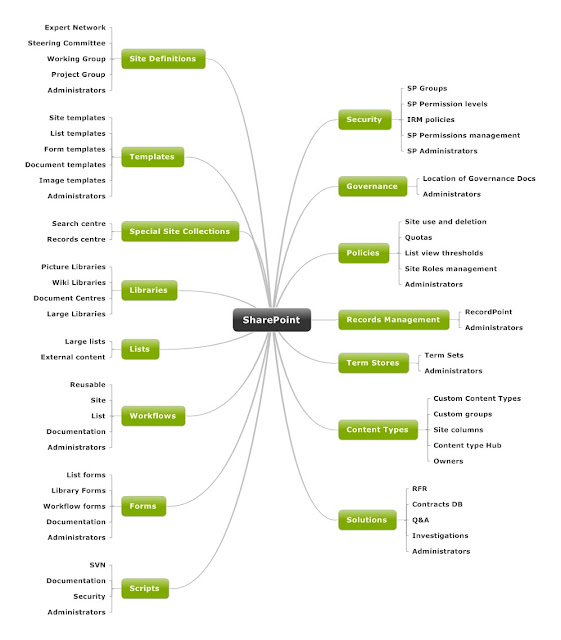
SharePoint Information Architecture Diagram

Here is the template I use for Information Architecture designs. It's built using Mindjet and I flesh the nodes out with the low level d...