First - put the servers into an array:
[Void][System.Reflection.Assembly]::Load("Microsoft.SharePoint, Version=12.0.0.0, Culture=neutral, PublicKeyToken=71e9bce111e9429c")
$farm = ([Microsoft.SharePoint.Administration.SPFarm]::Local`
%{ $_.Services} `
?{$_.typename -eq "Windows SharePoint Services Web Application"}`
%{$_.instances} `
%{$_.Server} `
%{$_.Address}
)
$farm
Then use a Foreach loop to step through each server in the array and restart the services on each:
foreach ($i in $farm)
{
$session = New-PSSession -ComputerName $i
Invoke-Command -Session $session -ScriptBlock { Restart-Service Sptimerv3 }
Invoke-Command -Session $session -ScriptBlock { Restart-Service Spadmin }
}
Remember to configure the firewall correctly and to ensure WinRM is initialized and enabled for Kerberos on the remote machines
Showing posts with label PowerShell SharePoint WinRM restart services farm WFEs. Show all posts
Showing posts with label PowerShell SharePoint WinRM restart services farm WFEs. Show all posts


Subscribe to:
Posts (Atom)
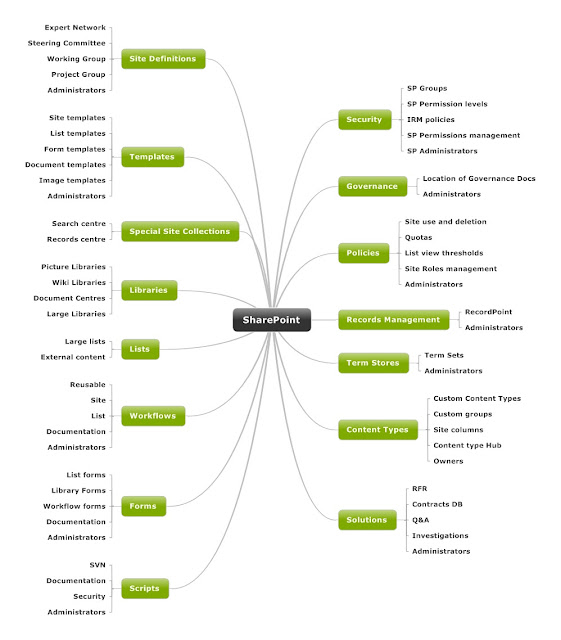
SharePoint Information Architecture Diagram
Here is the template I use for Information Architecture designs. It's built using Mindjet and I flesh the nodes out with the low level d...
-
 Introduction This document is intended to highlight possible causes of poor indexing performance on SharePoint 2007 farms as well as p...
 -
Using stsadm to stop the osearch service will blat all the indexes: In command prompt try running: taskkill.exe /F /IM mssearch.exe /T ...
-
 OPEN FIREWALL PORTS 56737 AND 56738 Submitted Request to Open firewall ports 56737 and 56738 in Approval Environment to enable Office Ser...