Showing posts with label SharePoint. Show all posts

Wednesday, 6 September 2017

Update site logo on all SharePoint sites in a site collection

Update site logo on all SharePoint sites in a site collection

Hi there - I used the script below to update the site logo on a bunch of SharePoint Site Collections today - hope it proves useful to you

 ## Set up the variables

$spWeb = Get-SPWeb $SiteURL
$logopath = "C:\Scripts\Logo\logo_SPsites.png"

Write-Host("- Uploading and updating site logo") -ForegroundColor Magenta


## Creating instance of Folder
$spFolder = $spWeb.GetFolder("SiteAssets")

## Getting the file on Disk that we want to upload
$file = Get-Item $logopath

## Uploading the file the the Site Assets library

$null = 
$spFolder.Files.Add("SiteAssets/logo_SPsites.png",$file.OpenRead(),$false)
   

## Set the logo on all webs in the site:      

$sitelogo="$siteurl/$spFolder/ERIS_logo_SPsites.png"

$Site=$SiteURL

$Sites=new-object Microsoft.SharePoint.SPSite($Site)

foreach($web in $Sites.Allwebs) {

$web.SiteLogoUrl=$sitelogo

$web.Update()}


$Sites.Dispose()

###########################################################################

That's it!

Tuesday, 14 February 2017

Translating SharePoint Audit log reports:

Translating Site ID and PrincipleID

I produced a Audit report for Security events and though I can see that some security events occurred on the relevant dates I couldn't find a way to translate the Site ID and the Principle ID in the Site ID and Event Data columns. 

It can be done! Enter PowerShell!!!!


Audit Log exported to Excel and downloaded: It just looks horrible


Translate the siteID:

$site = get-spsite -limit all
$site | select ID, url | ft -AutoSize | out-file C:\Scripts\siteID.txt

Then I did a find in the .txt file to match the site ID with the URL

e.g.


Translate the PrincipleID:
  
$site = new-object Microsoft.SharePoint.SPSite("http://SPWebApplication");  
$ServiceContext = [Microsoft.SharePoint.SPServiceContext]::GetContext($site);  
$ProfileManager = new-object Microsoft.Office.Server.UserProfiles.UserProfileManager($ServiceContext)    
$AllProfiles = $ProfileManager.GetEnumerator() 

$AllProfiles | select displayname,recordID | ft -autosize | out-file c:\scripts\profiles.txt

Then do a Find on the Principle ID and you will get the Display name mapping:


Translating groupid and userid

/_layouts/userdisp.aspx?id=


E.G

I’ve run a custom security report and the results show 5 permissions edits:


The Event Data column shows the user affected in group\user format


To find:

/_layouts/userdisp.aspx?id=218

/_layouts/userdisp.aspx?id=283

/_layouts/userdisp.aspx?id=8

Etc

This shows you either the user's information or the group's members depending on the entered id 

So: 
/_layouts/userdisp.aspx?id=218 - shows a user id
/_layouts/userdisp.aspx?id=8 - shows group membership


Note: The ids are unique within site collections only. So ...?id=42 within site collection A might be a different user or group in site collection B.


That's all folks - Thanks for visiting!

Tuesday, 27 December 2016

setting MAXMEM on servers in an Always On group


  1. No restarts required
  2. Use the following to set MAXMEM to 60GB (SQL had 64GB RAM so we left 4GB for the OS)

Enable advanced options:
USE master
EXEC sp_configure 'show advanced options', 1
RECONFIGURE WITH OVERRIDE

Set the maximum amount of memory to 64 MB:
USE master
EXEC sp_configure 'max server memory (MB)', 
61440
RECONFIGURE WITH OVERRIDE

Then refresh SSMS and review updated value in Properties


Thursday, 15 December 2016

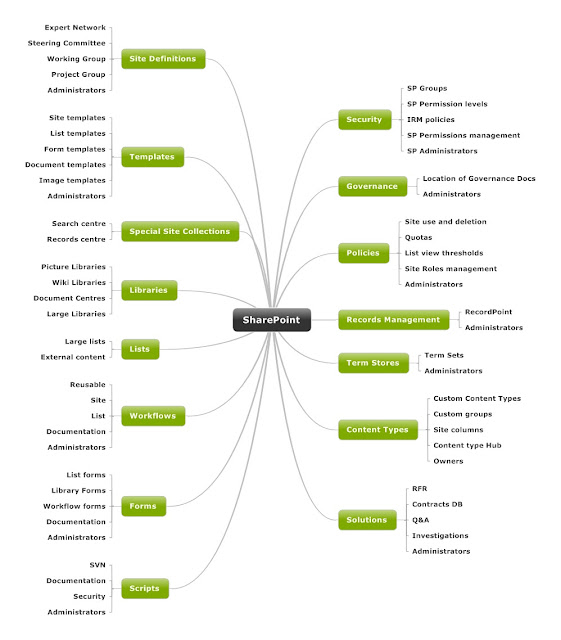
SharePoint Information Architecture Diagram

Here is the template I use for Information Architecture designs. It's built using Mindjet and I flesh the nodes out with the low level detail to build a comprehensive and easily readable document - some of the nodes on this one I've already started populating with the customised/third party solutions being used at this site (see Site Definitions, Records Management etc) - you get the idea - it grows...

Could also add Search top level node to this


Tuesday, 13 December 2016

Infopath substring function - use it to remove semi-colon

Doing some InfoPath and used the substring function with a nested string length function to remove the trailing semi-colon from a username

The username was stored in a list column called Workflow_To Notify

The substring function takes three arguments

1 - The text string which in this case is defined in the @workflow_ToNotify attribute

2 - The starting point - InfoPath starts counting at 1

3 - Use this with string-length and -1 to remove the last character - in this case the semi-colon


Happy SharePointing... InfoPathing... you know... whatever's your ing


Sunday, 11 December 2016

SharePoint Solution checker

Here is a nice little script I use to audit Solutions:


#This loads the SharePoint assemblies


asnp *sh* -ea 0

#Start solution audit

$allsolutions = (get-spsolution).SolutionID

foreach
($solution in $allsolutions)
{
$filteredfeaturelist = get-SPFeature | where {$_.SolutionID -eq "$solution"}
write-host -background Blue Name = $filteredfeaturelist.DisplayName
write-host -BackgroundColor Green -ForegroundColor Black Version = $filteredfeaturelist.ReceiverAssembly
write-host ""

}

SharePoint roles: Site Owner vs Site Moderator

These roles are often used in SharePoint deployments

Here is a break of the typical responsibilities:

Site Owner
Responsibilities: The Site Owner is formally responsible for the content of the site. He/she defines the overall purpose and need for the site, functional requirements (including components and layout), and makes high-level decisions about the site’s maintenance (such as closure/decommissioning of the site when no longer required). The Site Owner is also responsible for defining access permissions for the site, taking into account the need for collaboration as well as the potential sensitivity of the content involved.
Suggested person: The person within the organisation who is deemed responsible for the group/activity/function for which the site was created. Ideally a Manager (Team Leader or higher), Project Manager or Committee/Group member.


Site Moderator

Responsibilities: The Site Moderator is responsible for the general administration of the site. Tasks may include: performing user management within the available security groups on approval of the Site Owner; resolving document check-out issues; maintaining the site’s folder structure; first-line contact person for site members; raising tickets in case of technical issues. The Site Moderator is not responsible for making decisions about the site’s content; these are responsibilities of the Site Owner.

SharePoint Information Architecture Diagram

Here is the template I use for Information Architecture designs. It's built using Mindjet and I flesh the nodes out with the low level d...