Saturday, 23 March 2013

Kerberos impersonation vs delegation


Impersonation means to impersonate the client to access local resources -
delegation only applies to remote resources
In summary, impersonation is pretending to be someone else, other than the process identity, and access local resources
Delegation is authentication across machine boundary on behalf of someone else

PowerShell script - CRM version number and rollup updates


################
#     This script queries the local server registry to obtain the CRM version number and installs rollup updates depending on the returned version number
#  
#     Jonathan read and Jason Hough
#
#     14.02.13
#################

###Logging###


$scriptname = $MyInvocation.MyCommand.Name
$scriptpath = $MyInvocation.MyCommand.Path

$transcriptFile = "C:\Users\mgr1137107\Documents\Powershell_$scriptname.log"

Start-Transcript $transcriptFile -append -force

Write-Output "Starting Script: $scriptpath"


###Variables###

$path ="Registry::HKEY_LOCAL_MACHINE\SOFTWARE\Microsoft\MSCRM"
$name = "CRM_Server_Version"


###Trapping###


$p=Get-ItemProperty $path
if(!$p){


    'CRM is not deployed on this server'


}else{


    ' CRM is deployed on this server - the script will now continue'


}

###Functions###

FUNCTION DEPLOYMENT1

#Deploys rollup 6 then rollup 11

{ write-host "Deploying rollups 6 and 11"      }

FUNCTION DEPLOYMENT2

#Deploys rollup 11

{   write-host "Deploying rollup 11"     }


###VersionNumber###


    $key = Get-Item -LiteralPath $path -ErrorAction SilentlyContinue
    if ($key) {
        $key.GetValue($name, $null)
    }


# $VN = $key.GetValue($name, $null)
Write-host "The version number is "$key.GetValue($name, $null)

###CORE LOGIC###

if (

($Version -eq "5.0.9688.1045") -or ($Version -eq "5.0.9688.1157") -or ($Version -eq "5.0.9688.1244") -or ($Version -eq "5.0.9688.1450") -or ($Version -eq

"5.0.9688.1533")

 )

{DEPLOYMENT1}

else


{DEPLOYMENT2}


stop-transcript


Governing site quota increase requests


Check the following as a standard approach to these requests.

Each request should have the following four checks:

Check
Challenge
Expected Answer
Site Collection Admin
Has the request been completed by one of the Site Collection Administrators?
Yes
Warning Limit
Has the site storage reached the current quota warning limit (NB: All warning limits are 100Mb below the quota limit)?
Yes
Recycle Bin
Does the Site Collection recycle bin contain a large amount of content (i.e. if this was emptied or reviewed would this bring the site back under the current quota warning limit)?
No
Versioning
Does the site have uncontrolled versioning switched on in one or more document libraries or lists (i.e. Is the majority of the storage held in versions of files that are likely to be surplus to requirements)?
No

In addition to the above, check that the Cost Centre Manager approval is attached and the Cost Centre/Project Code is updated.

For all requests I expect to see the answers to the above recorded in the INTERNAL: Notes field as;
Site Collection Admin - Yes
Warning Limit - Yes
Recycle Bin - No
Versioning - No

If any of the items are not answered as expected then the increase should be rejected and the reason why noted in the notes field.

Excel column matching

If there are 200 cells are in ColA and 150 cells are in ColB, then at
C1 put the formula
=MATCH(A1,$B$1:$B$150,0)
and copy down to C200.

The cells in ColC that return #NA indicate the missing entries 

SQL SPN format


MSSQLSvc/FQDN:[port|instancename]

Sunday, 2 December 2012

Manage features pages


For Site (Web):
/_layouts/ManageFeatures.aspx

For Site Coll (Site):
/_layouts/ManageFeatures.aspx?Scope=Site

Friday, 24 August 2012

Powershell script - adds custom site column to content type (MOSS)


Used this script today to add a custom site column (Forarchive) to the core Content Type - Document

********************************************


[void][System.Reflection.Assembly]::Load("Microsoft.Office.Server.Search, Version=12.0.0.0, Culture=neutral, PublicKeyToken=71e9bce111e9429c")

[void][System.Reflection.Assembly]::Load("Microsoft.Sharepoint, Version=12.0.0.0, Culture=neutral, PublicKeyToken=71e9bce111e9429c")

[void][System.Reflection.Assembly]::Load("Microsoft.Office.Server, Version=12.0.0.0, Culture=neutral, PublicKeyToken=71e9bce111e9429c")

********************************************

$url = "http:///sites/sitename/"
$site = new-object Microsoft.SharePoint.SPSite($URL)

$web = $site.RootWeb

$ct=$web.ContentTypes["Document"];
$fieldAdd=$web.Fields["ForArchive"]
$fieldLink=New-Object Microsoft.SharePoint.SPFieldLink($fieldAdd)
$ct.FieldLinks.Add($fieldLink);
$ct.Update()

$web.Dispose()
$site.Dispose()


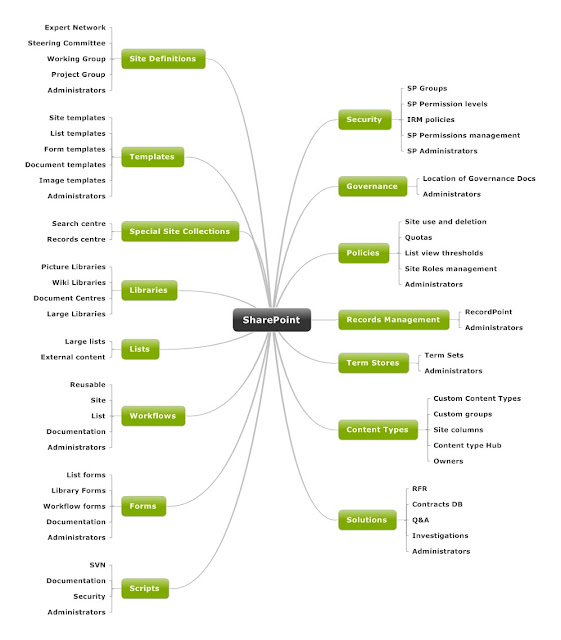
SharePoint Information Architecture Diagram

Here is the template I use for Information Architecture designs. It's built using Mindjet and I flesh the nodes out with the low level d...